FOR SERVICE PROVIDERS
The work comes to you.
Paid in 48 hours.
Sentinel sends commercial repair and maintenance jobs to local providers by trade and location. See the job on video and the limit before you say yes, do the work, upload the proof, and Sentinel writes the invoice. Payment lands within 48 hours of the work being confirmed.
Your jobs · HVAC and refrigeration
Job offered · rooftop unit not cooling, Store 112
Video and $450 limitYou accepted · booked for 10:30
Store toldPhotos and final cost uploaded
Invoice written for youPaid within 48 hours of confirmation
IN SHORT
What does Sentinel do for service providers?
Sentinel sends commercial repair and maintenance work to local service providers, one provider at a time, by trade and location. Each job arrives by call, text and email with the requester’s video, Sentinel’s diagnosis and the not-to-exceed limit, so you know what you’re walking into before you accept. You do the work and upload photos and the final cost. Sentinel writes the invoice, handles the sales tax and pays you within 48 hours of the work being confirmed. There is no bidding, no lead charge and no monthly fee.
ALREADY WORKING WITH US?
Provider support
Questions about a job, a check-in or a payment go to the provider team.
HOW WE WORK WITH PROVIDERS
You’re the customer
here.
Most platforms make providers compete for the job and wait to be paid for it. Sentinel connects you to the work and takes the admin off your hands, because a provider who wins makes the building better.
No bidding wars
Jobs go to one provider at a time, chosen by trade and location, never broadcast to a crowd. You see the video and the limit, then accept, pass or quote.
Paid in 48 hours, not 60 days
Payment lands by direct deposit within 48 hours of the requester confirming the work, faster with location services on. Every provider gets the same terms.
The paperwork is ours
Sentinel writes the invoice from your photos and final cost, handles the sales tax and keeps the property updated. No lead charges and no monthly fees.
HOWEVER YOUR BUSINESS RUNS
One technician
or a hundred.
Sentinel works with providers of every size. What changes is who does what in your business, so Sentinel fits the way your work already moves.
1–2 technicians
Owner-operators
You’re on the tools all day, so Sentinel runs the back office: the job, the booking, the updates to the property, the invoice and the payment. You do the work and take the photos.
- Jobs by text or email, answered from your phone
- The invoice written from your photos
- Paid within 48 hours of confirmation
10–20 technicians
Shops with an office
Your techs do the work and your office handles estimates and invoices. Sentinel keeps that split: estimates and approvals go to your office by email link, while the tech checks in on site and uploads the proof.
- Estimates handled by your office from an email link
- Techs check in by QR code and upload photos
- Your office keeps its own process
100+ technicians
Provider networks
You run your own dispatch, technology and workflows. We set Sentinel up around them, using only the parts you need, and agree how jobs, proof and payment pass between your systems and ours.
- Set up around your systems
- Use only the parts you need
- Agreed handoffs for jobs, proof and payment
HOW A JOB RUNS
From the text
to the deposit.
Every job runs the same way, from your phone: the offer arrives by call, text and email, and the link in it takes you from accepting the job to checking in on site.

Offered
A call, a text and an email with the property, the address, the requester’s video, Sentinel’s diagnosis and the not-to-exceed limit. You have four hours to answer.
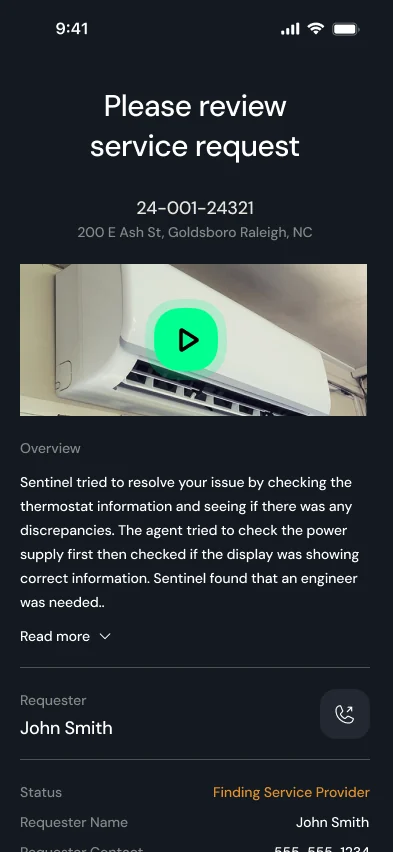
Accepted and booked
Watch the video, then accept within the limit or pass, and a job you pass goes back to the network. Pick a time and Sentinel tells the property.
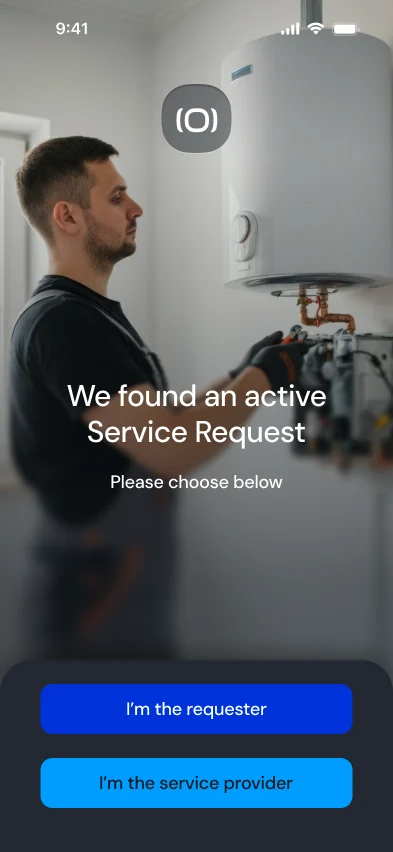
On site
Open the link from your text or email, or scan the property’s QR code, and choose your job. If the work will go over the limit, send an estimate with photos before you carry on.
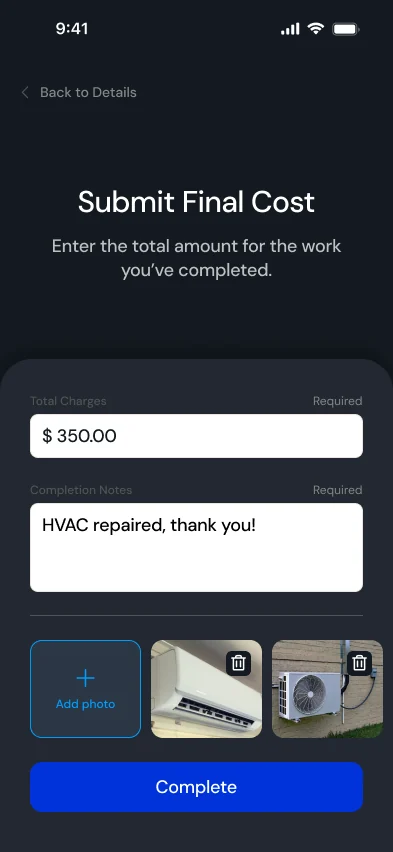
Paid
Enter the final cost and add photos of the finished work. Once the requester confirms, you’re paid within 48 hours.
Example screens from the provider walkthrough. Job details, names and amounts are illustrative.
WATCH · YOUR FIRST JOB
A provider’s first job,
start to finish.
The whole job in a minute and a half: the offer with the video and the limit, accepting, booking, checking in, closing out and getting paid.
JOINING THE NETWORK
Join from your phone.
Do the paperwork once.
When there’s work in your area, we send you a link to register. It takes four steps, and Sentinel keeps your documents current from then on.
Sign in with your phone
Enter your mobile number and the code we text you. No password to remember.
Your company profile
The services you provide, your address, how far you travel, your billing contact and whether you take after-hours work, so jobs match your trade and area.
Your paperwork, once
Upload your liability insurance, workers’ compensation and W-9. Sentinel checks them before your first job and reminds you before cover lapses.
Payouts and agreement
Add your payout details for direct deposit and sign the service provider agreement. We confirm your details and email you the next steps.
What you’ll need
- Certificate of liability insurance
- Workers’ compensation certificate
- W-9
- Bank details for direct deposit
On your phone
- Location on for Safari or Chrome, so payment isn’t held for a manual check
- Provider support saved in your contacts: (980) 243-0704
WORK NEAR YOU
Tell us where
you work.
We bring providers on region by region, where the jobs are coming in. Tell us your trade and your area, and we’ll let you know when there’s work near you and how to join.
QUESTIONS
What providers ask first.
Something else? Email providers@asksentinel.ai or call (980) 243-0704.
No. There are no lead charges and no monthly fees, and every provider in the network gets the same terms.
By a call, a text and an email, one provider at a time, chosen by trade and location and never broadcast. Each job carries the property, the address, the service type, the requester’s video, Sentinel’s diagnosis and the not-to-exceed limit, so you know what you’re walking into.
No. You accept the job within the limit or pass on it, and a job you pass goes back to the network. If the work turns out bigger than the limit once you’re on site, you send an estimate from there.
Four hours from the offer, so open the link when it arrives. Emergencies need a faster answer, and if a provider doesn’t accept in time, Sentinel offers the job to the next one.
Within 48 hours of the requester confirming the work, by direct deposit. Sentinel writes the invoice from your photos and final cost, so there is nothing to send. Keep location on in your phone’s browser: without it, payment waits while we verify the visit.
On an iPhone: Settings > Privacy & Security > Location Services, then set Safari or Chrome to allow. On Android: Settings > Apps > Chrome > Permissions > Location, then allow. Location confirms you were on site, so payment isn’t held for a manual check.
Update your quote with photos while you’re on site. The property decides, and if they say no, you are still paid for the work already done.
Yes. Estimates and approvals can go to your office by email link while your technicians do the work and upload the proof on site.
Yes. For larger networks we set Sentinel up around your systems and use only the parts you need. Tell us how you work in the form on this page.
Some larger clients bring their own providers onto Sentinel. Their jobs reach you the same way and you are paid the same way. Anything that client has agreed with you separately stays between you and them.
A mobile phone, your certificate of liability insurance, your workers’ compensation certificate, a W-9 and a bank account for direct deposit. You sign the service provider agreement as the last step.
The provider support team: providers@asksentinel.ai or (980) 243-0704.
FOR SERVICE PROVIDERS